Showing posts with label grand. Show all posts

How to Update Galaxy Grand Duos I9082 with Android 4.1.2 XXAMCE Jelly Bean Official Firmware

Saturday, October 26, 2013

Are You Looking For How to Update Galaxy Grand Duos I9082 with Android 4.1.2 XXAMCE Jelly Bean Official Firmware


Samsung recently started rolling out its official Android 4.1.2 Jelly Bean update for the Galaxy Grand Duos GT-I9082 in several countries. The new official firmware is now available for download through Samsung KIES as well as Over-The-Air (OTA) update in Southeast Asia countries - Indonesia, Malaysia, Philippines, Singapore, Vietnam and Thailand.

Firmware details
PDA: I9082XXAMCE
CSC: I9082OLBAMC4
Version: Android 4.1.2
Built date: March, 2013
Regions: Indonesia, Malaysia, Philippines, Singapore, Vietnam, Thailand

The Galaxy Grand Duos users who missed the OTA update notification and those who are residing outside the supported countries can manually download and install the same using our step-by-step guide given below.

Pre-requisites
1. Install USB Driver for Samsung Galaxy Grand Duos on the computer.
2. Enable USB Debugging Mode.
3. Make a backup of all your important data before following the guide.
4. The Galaxy Grand Duos should be factory unlocked and not locked to any particular carrier.
5. Ensure the battery of the phone is charged more than 80 per cent.
6. The Android 4.1.2 XXAMCE Jelly Bean firmware is compatible only with Samsung Galaxy Grand Duos I9082 and installing this on any incorrect variant will brick the device. Therefore, verify the model number of the Galaxy Grand Duos by navigating to Settings>> About Phone.

File Required
1. Android 4.1.2 XXAMCE Jelly Bean Firmware
2. Odin 3.07

Steps to Update Galaxy Grand Duos I9082 on Android 4.1.2 XXAMCE Jelly Bean Firmware
Step 1: Extract Firmware zip file that you downloaded already from above link, you will get a .tar.md5 file and some other files.
Step 2: Extract Odin zip file and you will get Odin3 v3.07.exe along with few other files.
Step 3: Power off your phone. Wait 5-6 seconds for vibration to confirm complete switch off.
Step 4: Boot the device into Download Mode by pressing and holding Volume Down + Home buttons together and then press the Power button until the device turns on. Now press the Volume Up button to enter Download Mode.
Step 5: Run Odin on the computer as an Administrator.
Step 6: Connect the Galaxy Grand Duos to the computer using USB cable while it is in the Download Mode. Wait until Odin detects the device. When the device is connected successfully, the ID: COM box will turn yellow with the COM port number. Additionally, the successful connected will be indicated by a message saying Added. If Odin fails to detect the device then re-install USB driver.
Step 7: Choose the following files in Odin from extracted I9082XXAMCE firmware folder by using respective checkboxes:
  • Select the PDA checkbox, and choose the file named .tar or .md5.
  • Click the Phone checkbox, and choose the file with 'modem' in its name (ignore if there is no such file)
  • Click the CSC checkbox, and select the file with 'csc' in its name (ignore if such file is missing)
  • Choose the PIT checkbox, and choose the .pit file. Use only the file obtained during extracting in step 1 above, otherwise ignore it.
Step 8: In Odin, enable Auto Reboot and F. Reset Time checkboxes. Also, ensure the Re-Partition checkbox is chosen only if a .pit file was chosen in the previous step.
Step 9: Verify everything suggested in Step 7 and Step 8 is done correctly. Then hit the START button to begin the flashing process.
Step 10: Once flashing completed, your phone will restart and soon you will see a PASS message with green background in the left-most box at the very top of the Odin. You can now unplug the USB cable to disconnect your device from computer.

Samsung Galaxy Grand Duos I9082 should be now updated with official Android 4.1.2 XXAMCE Jelly Bean. Head over to Settings>> About Phone to verify the software version running on the device.

Note: If Galaxy Grand Duos I9082 stuck at booting animation after Step 10 then go to recovery mode (press and hold the Volume Up, Home and Power buttons together) and perform Wipe data/Factory Reset and Wipe Cache Partition task before selecting reboot system now function. In recovery mode use Volume keys to navigate between options and Power key to select the option. Please note, performing wiping task will erase your device internal memory data and not external SD card data.

Click here to know How to Root Galaxy Grand Duos I9082 running on Android 4.1.2 XXAMCE Jelly Bean firmware.

Thanks for Read How to Update Galaxy Grand Duos I9082 with Android 4.1.2 XXAMCE Jelly Bean Official Firmware Article

How to Root Galaxy Grand Duos I9082 on Android 4.1.2 XXAMCE Jelly Bean Firmware

Are You Looking For How to Root Galaxy Grand Duos I9082 on Android 4.1.2 XXAMCE Jelly Bean Firmware


Samsung recently released its official Android 4.1.2 Jelly Bean update with firmware build number I9082XXAMCE for Galaxy Grand Duos bearing model number GT-I9082. The firmware is now available for download via Samsung KIES as well as Over-The-Air (OTA) in Southeast Asia regions.

Samsung Galaxy Grand Duos I9082 users who have already updated their devices with Android 4.1.2 XXAMCE Jelly Bean firmware, may root their devices using the tutorial below.

Disclaimer: Rooting voids the warranty of your device. We and the developer of this rooting procedures shall not be held responsible if any undesirable outcomes may happen to your device. use of this root guide is solely at your own risk!

Pre-Requisites
1. Install USB Driver for Samsung Galaxy Grand Duos on your computer.
2. Enable USB Debugging Mode. [Press Menu >> Settings >> Applications. From there navigate and tap on Development option and ensure the USB Debugging is turned on.]
3. Make a backup of all your important data before following the guide.
4. The Galaxy Grand Duos should be factory unlocked and not locked to any particular carrier.
5. Ensure the battery of the phone is charged more than 80 per cent.
6. The Recovery file and the SuperSU files used for rooting are compatible only with the Samsung Galaxy Grand Duos I9082. Applying theses on any incorrect variant will brick the device. Verify the model number of the Galaxy Grand Duos by selecting Settings >> About Phone.

File Required
1. Odin3_v3.07.rar
2. CWM-touch_i9082_chotu.tar.zip
3. Fix-Recovery.zip
4. UPDATE-SuperSU-v1.25.zip

Steps to Install CWM Recovery on Samsung Galaxy Grand Duos I9082
Step 1: Extract Odin3_v3.07.rar and CWM-touch_i9082_chotu.tar.zip files using winrar/7zip/winzip or any other extracting tool.
Step 2: Copy Fix-Recovery.zip and UPDATE-SuperSU-v1.25.zip files to external SD card of phone.
Step 3: Switch off the Galaxy Grand Duos. Then boot the device into Download Mode by pressing and holding Volume Down + Home buttons together and then press the Power button until the device turns on. Now press the Volume Up button to enter Download Mode.
Step 4: Run Odin on your computer.
Step 5: Connect the phone to the computer using the USB cable while the device is in the Download Mode. A message saying Added will arrive under Odin's message box in the bottom left. You will also get to see COM port with a number in Yellow when the phone is connected to the computer successfully.
Step 6: In Odin, click the PDA and select the CWM-touch_i9082_chotu.tar.md5 file. Also, ensure the Auto-Reboot and Re-Partition options in Odin is not selected.
Step 7: Double-check and click Start in Odin. The installation process will now begin.
Step 8: Once installation is completed, switch off the phone manually (Take out the battery). Then unplug the USB cable to disconnect it from computer.

Steps to Root Galaxy Grand Duos I9082 by Installing SuperSU via CWM Recovery
Step 9: Boot the phone into CWM Recovery by pressing and holding Volume Up + Home buttons together and then press the Power button until the device turns on.
Note: This should boot in CWM Recovery if you manually switch off the phone in Step-8.
Step 10: Now select install zip from sdcard, select choose zip from sdcard and then navigate to the Fix-Recovery.zip file. Select and confirm installation by selecting Yes.
Step 11: Return to main recovery menu and repeat Step 10 but this time choose UPDATE-SuperSU-v1.25.zip file.
Step 12: Once installation process is completed, return to main recovery menu and select reboot system now to reboot phone.

The Samsung Galaxy Grand Duos I9082, running official Android 4.1.2 XXAMCE Jelly Bean, is now rooted successfully.

Thank's to all fellas at XDA who first tried out this rooting technique. This root method was originally posted via XDA-Developers original thread.

Thanks for Read How to Root Galaxy Grand Duos I9082 on Android 4.1.2 XXAMCE Jelly Bean Firmware Article

How to Update Galaxy Grand Duos I9082 with Android 4.1.2 XXAMD6 Jelly Bean Official Firmware

Thursday, October 17, 2013

Are You Looking For How to Update Galaxy Grand Duos I9082 with Android 4.1.2 XXAMD6 Jelly Bean Official Firmware


Samsung has rolled out another official Jelly Bean update, Android 4.1.2 with base firmware XXAMD6, for the international version of Galaxy Grand Duos bearing model number GT-I9082. The new official firmware is now available for download through Samsung KIES as well as Over-The-Air (OTA) update in Southeast Asia countries including Indonesia, Malaysia, Philippines, Singapore,Vietnam and Thailand.

Firmware details
PDA: I9082XXAMD6
CSC: I9082OLBAMD3
Version: Android 4.1.2
Built date: April, 2013
Regions: Indonesia, Malaysia, Philippines, Singapore, Vietnam, Thailand

The Galaxy Grand Duos users who failed to receive the OTA update notification or unable to access the update over Samsung KIES can download and install the same manually, using our step-by-step guide.

Pre-requisites
1. Install USB Driver for Samsung Galaxy Grand Duos on the computer.
2. Enable USB Debugging Mode.
3. Make a backup of all your important data before following the guide.
4. The Galaxy Grand Duos should be factory unlocked and not locked to any particular carrier.
5. Ensure the battery of the phone is charged more than 80 per cent.
6. The Android 4.1.2 XXAMD6 Jelly Bean firmware is compatible only with Samsung Galaxy Grand Duos I9082 and installing this on any incorrect variant will brick the device.

File Required
1. Android 4.1.2 XXAMD6 Jelly Bean Firmware
2. Odin 3.07

Steps to Update Galaxy Grand Duos I9082 with Android 4.1.2 XXAMD6 Jelly Bean Firmware
Step 1: Extract Firmware zip file that you downloaded already from above link, you will get a .tar.md5 file and some other files.
Step 2: Extract Odin zip file and you will get Odin3 v3.07.exe along with few other files.
Step 3: Power off your phone. Wait 5-6 seconds for vibration to confirm complete switch off.
Step 4: Boot the device into Download Mode by pressing and holding Volume Down + Home buttons together and then press the Power button until the device turns on. Now press the Volume Up button to enter Download Mode.
Step 5: Run Odin on the computer.
Step 6: Connect the Galaxy Grand Duos to the computer using USB cable while it is in the Download Mode. Wait until Odin detects the device. When the device is connected successfully, the ID: COM box will turn yellow with the COM port number. Additionally, the successful connected will be indicated by a message saying Added. If Odin fails to detect the device then re-install USB driver.
Step 7: Choose the following files in Odin from extracted I9082XXAMD6 firmware folder by using respective checkboxes:
  • Select the PDA checkbox, and choose the file named .tar or .md5.
  • Click the Phone checkbox, and choose the file with 'modem' in its name (ignore if there is no such file)
  • Click the CSC checkbox, and select the file with 'csc' in its name (ignore if such file is missing)
  • Choose the PIT checkbox, and choose the .pit file. Use only the file obtained during extracting in step 1 above, otherwise ignore it.
Step 8: In Odin, enable Auto Reboot and F. Reset Time checkboxes. Also, ensure the Re-Partition checkbox is chosen only if a .pit file was chosen in the previous step.
Step 9: Verify everything suggested in Step 7 and Step 8 is done correctly. Then hit the START button to begin the flashing process.
Step 10: Once flashing completed, your phone will restart and soon you will see a PASS message with green background in the left-most box at the very top of the Odin. You can now unplug the USB cable to disconnect your device from computer.

Samsung Galaxy Grand Duos I9082 should be now updated with official Android 4.1.2 XXAMD6 Jelly Bean firmware. Head over to Settings>> About Phone to verify the software version running on the device.

Note: If Galaxy Grand Duos I9082 stuck at booting animation after Step 10 then go to recovery mode (press and hold the Volume Up, Home and Power buttons together) and perform Wipe data/Factory Reset and Wipe Cache Partition task before selecting reboot system now function. In recovery mode use Volume keys to navigate between options and Power key to select the option. Please note, performing wiping task will erase your device internal memory data and not external SD card data.

Click here to know How to Root Galaxy Grand Duos I9082 running on Android 4.1.2 XXAMCE Jelly Bean firmware.

Thanks for Read How to Update Galaxy Grand Duos I9082 with Android 4.1.2 XXAMD6 Jelly Bean Official Firmware Article

How to Update Galaxy Grand Duos I9082 with Android 4.1.2 XXAMF2 Jelly Bean Official Firmware

Tuesday, September 10, 2013

Are You Looking For How to Update Galaxy Grand Duos I9082 with Android 4.1.2 XXAMF2 Jelly Bean Official Firmware


An Official Android 4.1.2 Jelly Bean Over-The-Air (OTA) update with base firmware XXAMF2 has been released for the international version of Samsung Galaxy Grand Duos bearing model number GT-I9082. This firmware is currently available for the Galaxy Grand Duos users in India, Nepal, and Sri Lanka.

Firmware details
PDA: I9082XXAMF2
CSC: I9082ODDMF2
MODEM: I9082XXAME4
Version: Android 4.1.2
Built date: Jun 05, 2013
Regions: India, Nepal, Sri Lanka

Samsung Galaxy Grand Duos I9082 users who missed the OTA update notification or unable to access the update over Samsung KIES, may follow our step-by-step guide to install the update manually.

Pre-requisites
1. Install USB Driver for Samsung Galaxy Grand Duos on the computer.
2. Enable USB Debugging Mode on the phone by navigating to Settings >> Developer Options.
3. Make a backup of all your important data before following the guide.
4. The Galaxy Grand Duos should be factory unlocked and not locked to any particular carrier.
5. Ensure the battery of the phone is charged more than 80 per cent.
6. The Android 4.1.2 XXAMF2 Jelly Bean firmware is compatible only with Samsung Galaxy Grand Duos I9082. Applying this to any incorrect variant might brick the device. Verify the model number of the Galaxy Grand Duos by navigating to Settings >> About Phone.

File Required
1. Android 4.1.2 XXAMF2 Jelly Bean Firmware for Samsung Galaxy Grand Duos I9082
2. Odin 3.07

Steps to Update Galaxy Grand Duos I9082 with Android 4.1.2 XXAMF2 Jelly Bean Firmware
Step 1: Extract Firmware zip file that you downloaded already from above link using winrar/7zip/winzip or any other extracting tool, you will get a .tar.md5 file and some other files.
Step 2: Extract Odin zip file and you will get Odin3 v3.07.exe along with few other files.
Step 3: Power off your phone. Wait 5-6 seconds for vibration to confirm complete switch off.
Step 4: Boot the device into Download Mode by pressing and holding Volume Down + Home buttons together and then press the Power button until the device turns on. Now press the Volume Up button to enter Download Mode.
Step 5: Run Odin on the computer as an Administrator.
Step 6: Connect the Galaxy Grand Duos to the computer using USB cable while it is in the Download Mode. Wait until Odin detects the device. When the device is connected successfully, the ID: COM box will turn yellow with the COM port number. Additionally, the successful connected will be indicated by a message saying Added. If Odin fails to detect the device then re-install USB driver.
Step 7: Choose the following files in Odin from extracted I9082XXAMF2 firmware folder by using respective checkboxes:
  • Select the PDA checkbox, and choose the file named .tar or .md5.
  • Click the Phone checkbox, and choose the file with 'modem' in its name (ignore if there is no such file)
  • Click the CSC checkbox, and select the file with 'csc' in its name (ignore if such file is missing)
  • Choose the PIT checkbox, and choose the .pit file. Use only the file obtained during extracting in step 1 above, otherwise ignore it.
Step 8: In Odin, enable Auto Reboot and F. Reset Time checkboxes. Also, ensure the Re-Partition checkbox is chosen only if a .pit file was chosen in the previous step.
Step 9: Verify everything suggested in Step 7 and Step 8 is done correctly. Then hit the START button to begin the installation process.
Step 10: Once the installation process is completed, your phone will restart and soon you will see a PASS message with green background in the left-most box at the very top of the Odin. You can now unplug the USB cable to disconnect your device from computer.

Samsung Galaxy Grand Duos I9082 should be now updated with official Android 4.1.2 XXAMF2 Jelly Bean firmware. Head over to Settings >> About Phone to verify the software version running on the device.

Note: If Galaxy Grand Duos I9082 stuck at booting animation after Step 10 then go to recovery mode (press and hold the Volume Up, Home and Power buttons together) and perform Wipe data/Factory Reset and Wipe Cache Partition task before selecting reboot system now function. In recovery mode use Volume keys to navigate between options and Power key to select the option. Please note, performing wiping task will erase your device internal memory data and not external SD card data.

Click here to know How to Root Galaxy Grand Duos I9082 running on Android 4.1.2 XXAMCE Jelly Bean firmware.

Thanks for Read How to Update Galaxy Grand Duos I9082 with Android 4.1.2 XXAMF2 Jelly Bean Official Firmware Article

How to Update Galaxy Grand Duos I9082 with Android 4.1.2 XXAMF5 Jelly Bean Official Firmware

Sunday, September 1, 2013

Are You Looking For How to Update Galaxy Grand Duos I9082 with Android 4.1.2 XXAMF5 Jelly Bean Official Firmware


Samsung recently released another Android 4.1.2 Jelly Bean firmware update with base firmware XXAMF5 for the owners of Samsung Galaxy Grand Duos bearing model number GT-I9082 in Southeast Asia countries. This official firmware is currently available as an Over-The-Air (OTA) update as well as through Samsung KIES.

Firmware details
PDA: I9082XXAMF5
CSC: I9082OLBAMF1
MODEM: I9082XXAME2
Version: Android 4.1.2
Built date: Jun 11, 2013
Regions: Indonesia, Malaysia, Philippines, Singapore, Vietnam, Thailand

Samsung Galaxy Grand Duos I9082 users who missed the OTA update notification or unable to access the update over Samsung KIES, may follow our step-by-step guide to install the update manually.

Pre-requisites
1. Install USB Driver for Samsung Galaxy Grand Duos on the computer.
2. Enable USB Debugging Mode on the phone by navigating to Settings >> Developer Options.
3. Make a backup of all your important data before following the guide.
4. The Galaxy Grand Duos should be factory unlocked and not locked to any particular carrier.
5. Ensure the battery of the phone is charged more than 80 per cent.
6. The Android 4.1.2 XXAMF5 Jelly Bean firmware is compatible only with Samsung Galaxy Grand Duos I9082. Applying this to any incorrect variant might brick the device. Verify the model number of the Galaxy Grand Duos by navigating to Settings >> About Phone.

File Required
1. Android 4.1.2 XXAMF5 Jelly Bean Firmware for Samsung Galaxy Grand Duos I9082
2. Odin 3.07

Steps to Update Galaxy Grand Duos I9082 with Android 4.1.2 XXAMF5 Jelly Bean Firmware
Step 1: Extract Firmware zip file that you downloaded already from above link using winrar/7zip/winzip or any other extracting tool, you will get a .tar.md5 file and some other files.
Step 2: Extract Odin zip file and you will get Odin3 v3.07.exe along with few other files.
Step 3: Power off your phone. Wait 5-6 seconds for vibration to confirm complete switch off.
Step 4: Boot the device into Download Mode by pressing and holding Volume Down + Home buttons together and then press the Power button until the device turns on. Now press the Volume Up button to enter Download Mode.
Step 5: Run Odin on the computer as an Administrator.
Step 6: Connect the Galaxy Grand Duos to the computer using USB cable while it is in the Download Mode. Wait until Odin detects the device. When the device is connected successfully, the ID: COM box will turn yellow with the COM port number. Additionally, the successful connected will be indicated by a message saying Added. If Odin fails to detect the device then re-install USB driver.
Step 7: Choose the following files in Odin from extracted I9082XXAMF5 firmware folder by using respective checkboxes:
  • Select the PDA checkbox, and choose the file named .tar or .md5.
  • Click the Phone checkbox, and choose the file with 'modem' in its name (ignore if there is no such file)
  • Click the CSC checkbox, and select the file with 'csc' in its name (ignore if such file is missing)
  • Choose the PIT checkbox, and choose the .pit file. Use only the file obtained during extracting in step 1 above, otherwise ignore it.
Step 8: In Odin, enable Auto Reboot and F. Reset Time checkboxes. Also, ensure the Re-Partition checkbox is chosen only if a .pit file was chosen in the previous step.
Step 9: Verify everything suggested in Step 7 and Step 8 is done correctly. Then hit the START button to begin the installation process.
Step 10: Once the installation process is completed, your phone will restart and soon you will see a PASS message with green background in the left-most box at the very top of the Odin. You can now unplug the USB cable to disconnect your device from computer.

Samsung Galaxy Grand Duos I9082 should be now updated with official Android 4.1.2 XXAMF5 Jelly Bean firmware. Head over to Settings >> About Phone to verify the software version running on the device.

Note: If Galaxy Grand Duos I9082 stuck at booting animation after Step 10 then go to recovery mode (press and hold the Volume Up, Home and Power buttons together) and perform Wipe data/Factory Reset and Wipe Cache Partition task before selecting reboot system now function. In recovery mode use Volume keys to navigate between options and Power key to select the option. Please note, performing wiping task will erase your device internal memory data and not external SD card data.

Click here to know How to Root Galaxy Grand Duos I9082 running on Android 4.1.2 XXAMCE Jelly Bean firmware.

Thanks for Read How to Update Galaxy Grand Duos I9082 with Android 4.1.2 XXAMF5 Jelly Bean Official Firmware Article

How to Update Galaxy Grand Duos I9082 with Leaked Android 4.2.2 Jelly Bean Official Test Firmware

Thursday, August 8, 2013

Are You Looking For How to Update Galaxy Grand Duos I9082 with Leaked Android 4.2.2 Jelly Bean Official Test Firmware


An official test firmware based on Android 4.2.2 Jelly Bean has leaked for Samsung Galaxy Grand Duos with model number GT-I9082.

Firmware details
PDA: I9082XXUBMF2
CSC: I9082OXABMF2
MODEM: I9082XXUBMF2
Version: Android 4.2.2
Built date: Jun 13, 2013

According to SamMobile, the leaked Android 4.2.2 update is expected to bring a host of new features such as transparent notification bar, Smart Stay, Light effect by unlocking, Page Buddy and Day dream.

Samsung Galaxy Grand Duos I9082 users can now update their devices with the leaked version of Android 4.2.2 Jelly Bean firmware by following the tutorial below.

Pre-requisites
1. Install USB Driver for Samsung Galaxy Grand Duos on the computer.
2. Enable USB Debugging Mode on the phone by navigating to Settings >> Developer Options.
3. Make a backup of all your important data before following the guide.
4. The Galaxy Grand Duos should be factory unlocked and not locked to any particular carrier.
5. Ensure the battery of the phone is charged more than 80 per cent.
6. The Android 4.2.2 Jelly Bean firmware is compatible only with Samsung Galaxy Grand Duos I9082. Applying this to any incorrect variant might brick the device. Verify the model number of the Galaxy Grand Duos by navigating to Settings >> About Phone.

File Required
1. Android 4.2.2 Jelly Bean Firmware for Samsung Galaxy Grand Duos I9082
2. Odin 3.07

Steps to Update Galaxy Grand Duos I9082 with Android 4.2.2 Jelly Bean Firmware
Step 1: Extract Firmware rar file that you downloaded already from above link using winrar/7zip/winzip or any other extracting tool.
Step 2: Extract Odin zip file and you will get Odin3 v3.07.exe along with few other files.
Step 3: Power off your phone. Wait 5-6 seconds for vibration to confirm complete switch off.
Step 4: Boot the device into Download Mode by pressing and holding Volume Down + Home buttons together and then press the Power button until the device turns on. Now press the Volume Up button to enter Download Mode.
Step 5: Run Odin on the computer as an Administrator.
Step 6: Connect the Galaxy Grand Duos to the computer using USB cable while it is in the Download Mode. Wait until Odin detects the device. When the device is connected successfully, the ID: COM box will turn yellow with the COM port number. Additionally, the successful connected will be indicated by a message saying Added.
Step 7: Choose the following files in Odin from extracted I9082XXUBMF2 firmware folder by using respective checkboxes:
  • Click the PDA checkbox, and choose CODE_I9082XXUBMF2_871997_REV05_user_mid_noship.tar.md5.
  • Click the Phone checkbox, and choose MODEM_I9082XXUBMF2_REV05.tar.md5.
  • Click the CSC checkbox, and choose CSC_OXA_I9082OXABMF2_871997_REV05_user_mid_noship.tar.md5.
  • Click the PIT checkbox, and choose baffin.pit.
Step 8: In Odin, enable Auto Reboot and F. Reset Time checkboxes. Also, ensure the Re-Partition option is not selected.
Step 9: Verify everything suggested in Step 7 and Step 8 is done correctly. Then hit the START button to begin the installation process.
Step 10: Once the installation process is completed, your phone will restart and soon you will see a PASS message with green background in the left-most box at the very top of the Odin. You can now unplug the USB cable to disconnect your device from computer.

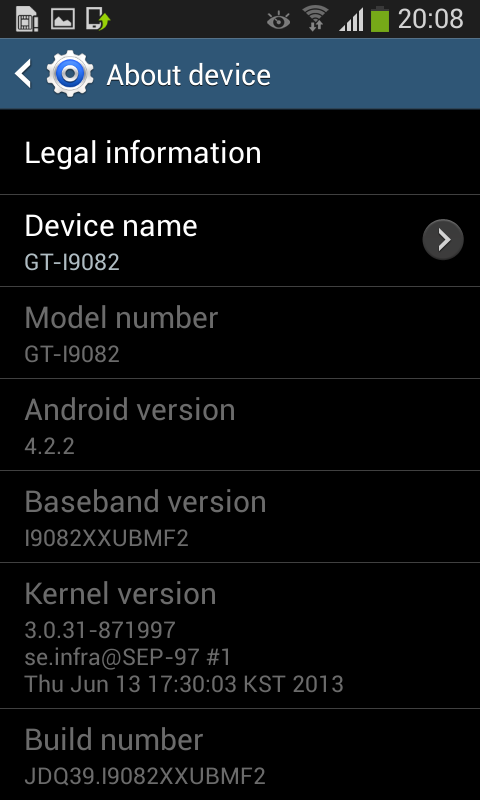
Samsung Galaxy Grand Duos I9082 should be now updated with the leaked version of Android 4.2.2 Jelly Bean firmware. Head over to Settings >> About Phone to verify the software version running on the device.

Android 4.2.2 XXUBMF2 Jelly Bean

Note: If Galaxy Grand Duos I9082 stuck at booting animation after Step 10 then go to recovery mode (press and hold the Volume Up, Home and Power buttons together) and perform Wipe data/Factory Reset and Wipe Cache Partition task before selecting reboot system now function. In recovery mode use Volume keys to navigate between options and Power key to select the option. Please note, performing wiping task will erase your device internal memory data and not external SD card data.

Source: SamMobile

Thanks for Read How to Update Galaxy Grand Duos I9082 with Leaked Android 4.2.2 Jelly Bean Official Test Firmware Article


Root Your Android Copyright © 2011-2013 | Powered by Blogger